Browse guides
Install tracking
The two pieces every product needs, and how a click on www.acme.com is still credited when the customer pays on app.acme.com.
5 min read · For companies
Attribution takes two pieces of code. Both are small, and the framework pages under Integrate show them for Next.js, TanStack Start, React Router, Nuxt, SvelteKit, Astro, Express and Hono.
| Piece | Where | What it does |
|---|---|---|
| 1. The snippet | Every page a partner link can land on | Reports the click to your instance and stores a click id in a first-party cookie, br_click. |
| 2. The click on the Stripe object | Your server, where it creates the Checkout Session (and the customer, if at signup) | Writes the click id into Stripe, so the payment and its renewals are credited to the partner. |
1. Add the snippet
Copy it from Integrations → Tracking & links: it has your instance's address and settings filled in. It is about 3 KB, loads asynchronously and never throws.
<script async src="https://rewards.acme.com/v1/br.js"></script>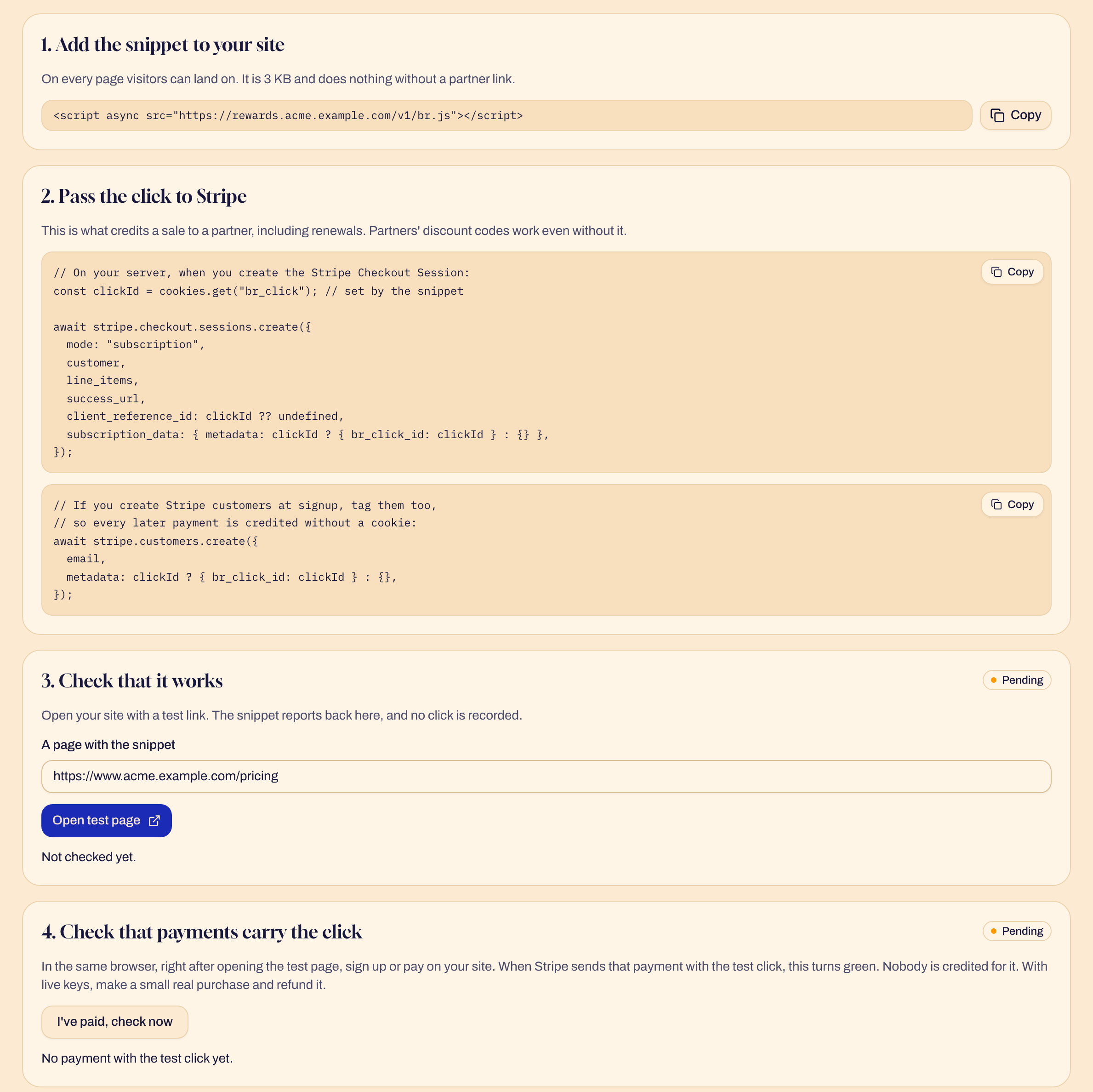
A visitor arriving with ?via=<code> is recorded as a click, and the click id lasts as long as the program's attribution window. Single-page apps are covered: the snippet records again when the URL changes without a page load.
2. Pass the click to Stripe
On your server, read the br_click cookie and put it on the Checkout Session: as client_reference_id (unless you already use it) and as metadata.br_click_id, also on the subscription in subscription mode. This helper does all three:
import type Stripe from "stripe";

// betterrewards: copy this file into your app. It has no dependencies.
const CLICK_ID = /^clk_[0-9a-f]{32}$/;

/** A click id stored by the snippet, or null. Pass the br_click cookie's value. */
export function clickId(value: string | null | undefined): string | null {
  return value && CLICK_ID.test(value) ? value : null;
}

/** Reads the click id from a raw Cookie header. */
export function clickIdFromCookieHeader(header: string | null | undefined): string | null {
  const match = header?.match(/(?:^|;\s*)br_click=([^;]+)/);
  return clickId(match?.[1] ? decodeURIComponent(match[1]) : null);
}

/** Credits a Checkout Session, and the subscription it starts, to the referring partner. */
export function withReferral(
  params: Stripe.Checkout.SessionCreateParams,
  id: string | null,
): Stripe.Checkout.SessionCreateParams {
  if (!id) return params;
  return {
    ...params,
    client_reference_id: params.client_reference_id ?? id,
    metadata: { ...params.metadata, br_click_id: id },
    ...(params.mode === "subscription" && {
      subscription_data: {
        ...params.subscription_data,
        metadata: { ...params.subscription_data?.metadata, br_click_id: id },
      },
    }),
  };
}

/** Metadata for stripe.customers.create at signup, so later payments need no cookie. */
export function referralMetadata(id: string | null): Record<string, string> {
  return id ? { br_click_id: id } : {};
}const id = clickId(cookies.get("br_click"));
const session = await stripe.checkout.sessions.create(withReferral({
mode: "subscription",
line_items: [{ price: "price_123", quantity: 1 }],
success_url: "https://app.acme.com/welcome",
cancel_url: "https://www.acme.com/pricing",
}, id));const id = clickId(cookies.get("br_click"));
const intent = await stripe.paymentIntents.create({
amount: 4900,
currency: "usd",
metadata: referralMetadata(id), // optional: br_product_id: "prod_123"
});Create Stripe customers at signup? Add metadata: referralMetadata(id) to stripe.customers.create as well. Every later payment of that customer is then credited without the cookie, even weeks later or after Safari has cleared it.
Marketing site on www, product on app
The common setup: partners link to www.acme.com, and people sign up and pay on app.acme.com. It works without extra code, as long as both are subdomains of the same domain:
- Put the snippet on www.acme.com, where partner links land. Set the program's landing page to an address there, such as https://www.acme.com/pricing.
- The snippet stores the click on the registrable domain, acme.com, not on www.acme.com. Every subdomain receives it, so app.acme.com's server finds br_click in the request's Cookie header.
- On app.acme.com, pass the click to Stripe at signup and at checkout (step 2). The snippet is optional there; add it if partners also link straight into the app, for example to a signup page.
https://www.acme.com/pricing?via=ada        snippet records the click
  → Set-Cookie br_click=clk_…; Domain=acme.com
https://app.acme.com/signup                 Cookie: br_click=clk_…
  → stripe.customers.create({ metadata: { br_click_id } })
  → stripe.checkout.sessions.create({ client_reference_id, metadata })
Stripe → your instance                      commission for ada
Platform subdomains are not one domain: acme.vercel.app and acme-app.vercel.app cannot share a cookie, because vercel.app is a public suffix (so are netlify.app, pages.dev and workers.dev). Use your own domain, or treat them as separate domains as described next.
Marketing site and product on different domains
When the product lives on another domain, such as acme.com and acme.app, a cookie cannot follow. The snippet carries the click in the link instead:
- In Integrations → Tracking & links → Your other domains, add acme.app and save. The snippet you copy then has data-outbound="acme.app".
- Replace the snippet on acme.com with the new one. When a visitor follows a link to acme.app, the snippet adds ?br_click=<id> to it just before the browser leaves.
- Add the same snippet to acme.app. It reads br_click from the address and stores it as its own cookie, so your server there reads it as usual.

<script async src="https://rewards.acme.com/v1/br.js" data-outbound="acme.app"></script>Check it
Then check it in your instance under Integrations → Tracking & links: Open test page proves the snippet runs on your site, and a test payment followed by I've paid, check now proves the click reaches Stripe. Nobody is credited for the test.
- In the browser's developer tools, the br_click cookie appears on acme.com after opening a page with ?via=<a partner's code>.
- In Stripe, the Checkout Session shows client_reference_id clk_… and the metadata br_click_id.
- In your instance, the purchase appears under Commissions → Conversions, credited to the partner.